Monday, November 21, 2016

Week 12- MKTG 349- Officially AdWords Certified

I took the additional Search Advertising exam that was needed to become certified. It took a couple tries to pass, but I did it! Similar to the main AdWords Fundamentals test, the Search Advertising test had 100 questions and needed an 80% to pass.

My test score

The Google Partners AdWords certification expires in 1 year. If I want to keep the certification, I must study for the tests and take them again. The reason for this is because technology is forever evolving, and we must be up to date on the latest trends to manage our campaigns online. 


In addition, adding the AdWords certification to your resume can boost your chances of landing and interview, or even a job!

Tuesday, November 15, 2016

Week 11- MKTG 349- CPC Bidding

CPC bidding means cost-per-click. It's primarily used when you want to drive potential customers to your website. It is best to maximize your CPC so you only pay when someone clicks on your ad. You can set the bid (Manual bidding), or just select "max. CPC" when editing your Google AdWords campaign. By selecting "Automatic bidding," Google can set a bid for you based on your total budget.

The goal is to get as many clicks as possible. Based on your overall quality score, your ad rank can surpass other competitors and lower the amount you actually have to pay. This is known as your Actual CPC. The image below is a great visual representation of how the components intertwine with each other.


Maximum bids don't necessarily mean that your ad rank will increase. Depending on your company and budget, you can control your bidding for individual keywords and Display Network target settings. The only bad thing about Manual bidding is the time and maintenance it takes.

Tuesday, November 8, 2016

Week 10- MKTG 349- Nature Conservancy Campaign

As a different approach on Google AdWords, I decided to create a campaign promoting The Nature Conservancy. I decided to create an entirely new campaign (my first one was Bailey's Facebook page) because it is an completely different category of what the first one was. I also felt that that growing concerns about climate change and carbon emissions have increased the search rate on Google to help solve these issues.

I set the campaign type to be a Search Network only with all features, targeting locations all over the globe. The bidding strategy is to maximize clicks with a budget of $5.00 per day.

Campaign Ad

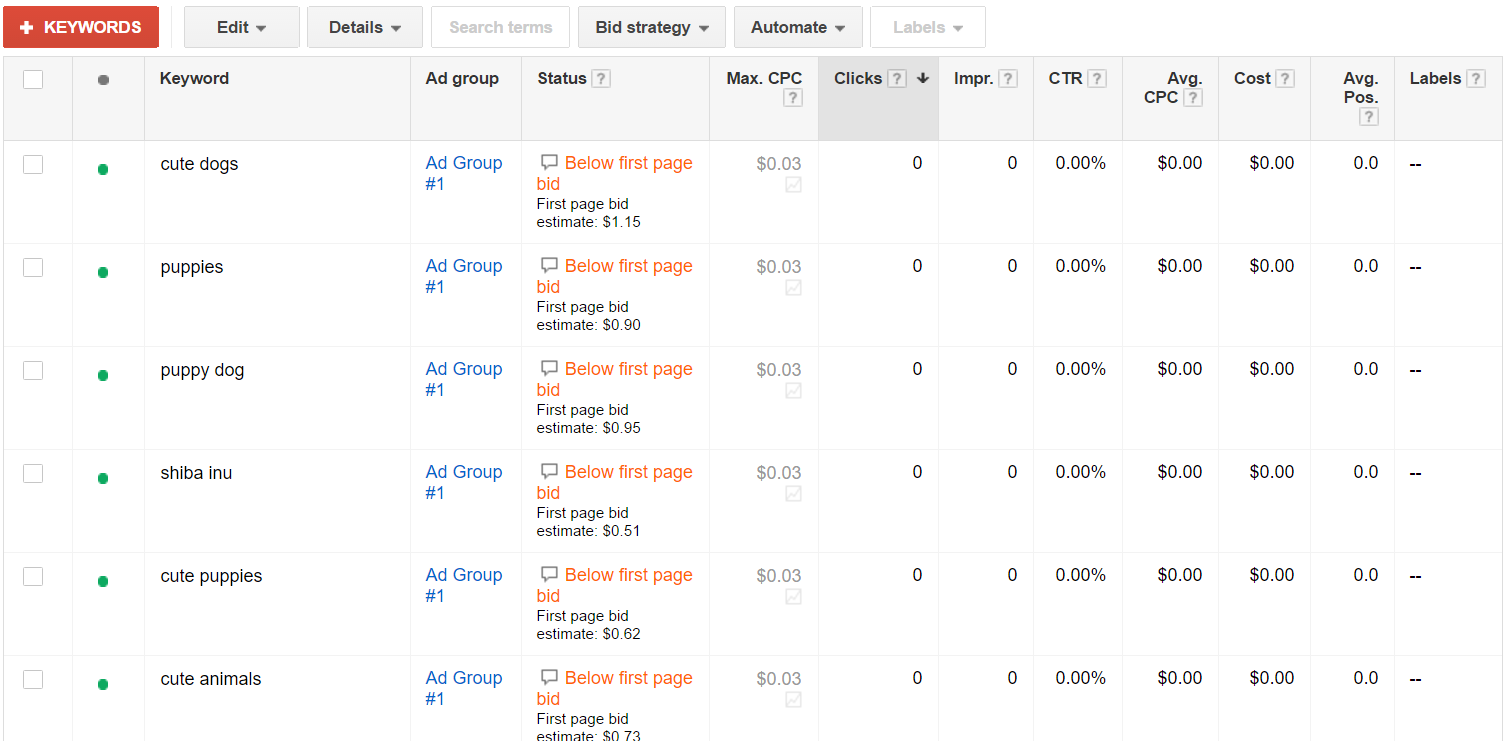
So far, I included 14 keywords to help boost my quality score compared to other competitors. Most keywords are simple and straight forward, but others have more specific short sentences asking how to help conserve resources. Based on the performance of each keyword, I will keep track of which ones to keep and which ones to discard or add to negative keywords. Once I can determine that, my Actual CPC should be lower than my Maximum bid on the campaign.

Keywords for The Nature Conservatory Campaign

Thursday, November 3, 2016

Week 9- MKTG 349- Passing the AdWords Fundamentals Exam

It took a lot of time and effort to prepare for the exam. After the third attempt, I passed on October 24th, 2016 with an 85%! An 80% is needed to pass the exam.


The Fundamentals exam isn't the only test you need to pass the get certified. One more specific category (Search, Display, Video, Shopping, or Mobile) is required to officially add it to your resume. In this case, I will now be preparing for only passing the Search Advertising category in order to get my certificate. You can find these categories located directly under the AdWords Fundamentals exam when you click on the AdWords tab in your Google Partners account.

Wednesday, October 26, 2016

Week 8- MKTG 349- Finding the Right Keywords for You

Adding keywords into your AdWords Campaign might seem pretty easy, but it actually takes some time and evaluation of what your website provides and what your target audience might search. You can include multiple broad keywords, but it is best to also include as many specific phrases that you can think of for your campaign Who knows, there might be a lot of people that actually type it into the search bar. There's only one way to find out!

The goal of keywords is to attract individuals that might like to visit your website and purchase your item or service, but they just don't know it yet. For example, if you own an online shopping site that sells automatic watches, you would provide keywords such as, "automatic watches" or "automatic watches for men and women." These keywords would have a higher level of traffic of individuals searching for this type of product. If you are selling something more specific and unique, such as automatic wooden watches, you might want to try phrases more specific like; "automatic watches made out of cherry wood" or "oak wood watches that are automatic." These phrases might not get a lot of volume, but you would never know unless you tried, right? There might be hundreds of thousands of people looking for a different kind of watch for them or as a gift. Another good phrase to add might be, "unique automatic watches for sale." 
Tense wooden watches website after searching, "automatic wooden watches"
All together, the more specific the keyword phrase is, the higher the chances someone might click on your site right away, because the phrase is specific to you and your unique product. AdWords makes creating keywords and phrases easy to create and maintain under the Keyword Planner tab of your Tools bar.

Thursday, October 20, 2016

Week 7- MKTG 349- Campaign Strategies

An wonderful feature that Google AdWords provides is their Help tab. This tab is located in your settings icon on the top right-hand side of your screen. The bell icon, located directly to the right of the settings icon, suggests helpful tips when preparing and examining your campaigns.


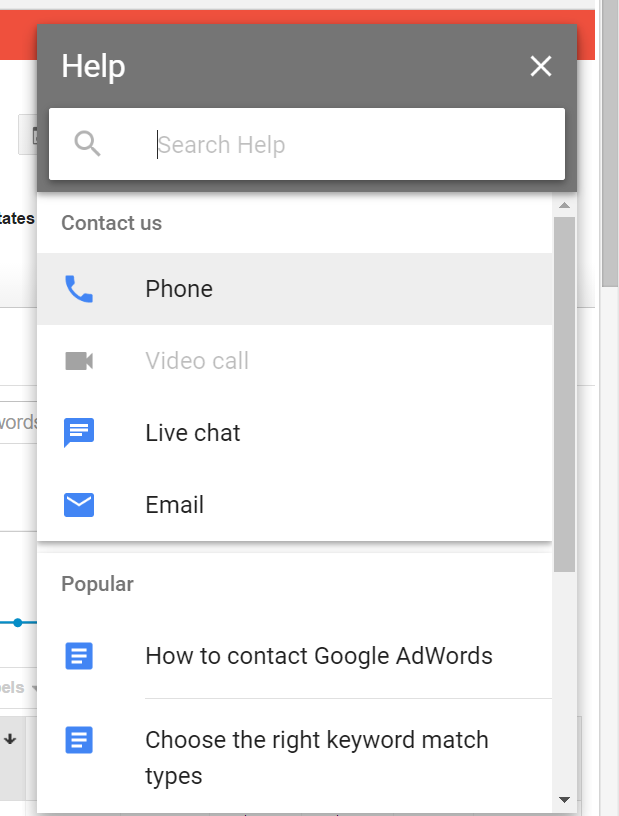
AdWords offers multiple convenient ways for users to contact support with any questions. If you'd like to talk with someone over the phone, an 800 number is provided along with the times to call for help. If not, you can click on the Help tab to bring you to a different menu. This menu is shown below.


You can contact support by Email, Phone, or chatting through online messaging. Searching subjects in the search bar above is another alternative to finding answers to any questions. Video calls were not available at the time I was looking for help, so I decided to set up a live chat. Once clicking on the option, I was brought to a message box asking me to select a category I needed help with. I selected Ad Performance in the category box and was able to type out a question. Within seconds, Catherine from Google Support messaged me and I was able to quickly resolve my issue.


Google AdWords Help features are a great perk to the website and are available 24/7!

Monday, October 10, 2016

Week 6- MKTG 349- Callout Extensions

Call Extensions are another useful tool provided by Google AdWords to encourage consumers to click on your ad. It's purpose is to display benefits or services unique to your business. The key to successful call extensions is to keep them "short and sweet." This way, businesses boost their quality scores while lowering costs at the same time!

Here is an example of a shoe company ad including callout extensions.


Inside the blue outline are the call extensions. It is best to provide at least two and no more than six. You can find out how to create callout extensions on your Google AdWords Campaign by clicking on this link. 

Week 5- MKTG 349- Keywords Planner

To efficiently manage your keywords and negative keywords, click on the Tools tab when logged into your Google Adwords account.


This menu can help you determine keyword trends, CPC prices, and create your own keyword combinations. It even gives the opportunity to target consumers based on location and language.

This keyword tool helped me forecast which keywords I should keep or delete. Since my campaign is to advertise my dog Bailey to shiba lovers, I decided to type in "shiba inu dog" to see how much CPC that would reel in over the next week.


As shown in the screenshot above, we see the amount of clicks, impressions made, and the anticipated cost for the keyword during a seven day run time. This information is useful because I am able to determine how much the keyword might be worth to my Campaign and daily budget.

Tuesday, October 4, 2016

Week 4- MKTG 349- AdWords Campaign: Keywords

I decided to create an AdWords Campaign for a Facebook page I made last year. The Facebook page is dedicated to my pet dog, Bailey. In order to correctly run the campaign, I created multiple keywords to link my ad to.


I have chosen about 15 broad keywords. The campaign is currently paused, but once I provide my billing information and resume it, the CPC and amount of clicks will turn into numbers. This data will provide us with how well my chosen keywords are doing. By analyzing the data, I can determine if I need to delete or even create negative keywords in order to increase the amount of clicks during the campaign. This will improve my ads relevance to my specific keywords. Overall, monitoring the performance of the keywords will determine how my budget is being utilized to get the most "bang for my buck."

Tuesday, September 27, 2016

Week 3- MKTG 349- AdWords Fundamentals Exam: Attempt #1

After studying the content needed to pass the Google AdWords exam, I got a 67% out of a possible 100%. An 80% is needed to pass for the AdWords certification. 

I wish I could go back and review the questions that I missed because it seemed some of the questions had more than one right answer. I plan on going back to review the materials provided through the Google Partners website. Hopefully next time I take the exam I will get a passing grade. We'll just have to wait another week to find out!


Tuesday, September 13, 2016

Week 2- MKTG 349- AdWords Campaign


In order to create an AdWords Campaign, you first must go to the AdWords website and sign in under your Google gmail account. Once logged in, you are able to view all information under any past Campaigns created. At this time, we don't have any. So lets make one! By clicking on the Campaigns tab towards the top of your screen, you have a variety of Campaign types to select from. Since we are beginners here, we'll keep it easy and choose the "Search Network Only" option including all features.

Considering how to utilize your budget and timeline are the most important parts of your campaign. In our case, it's a good idea to set up a small budget with a low amount paid per day (lets stick with $5). Also, setting up a one or two day timeline would keep you from forgetting to turn the campaign off so you don't end up spending a fortune!

Next, you are able to create your URL, headlines, and description. AdWords even lets you preview how the ad will look on a consumers desktop and mobile device. Creating certain keywords related to your ad will improve your chances of consumers clicking on it. In addition, AdWords provides an "Estimate search traffic" button for every keyword you try. So go ahead. Take a chance and try out how successful your first AdWords Campaign could be! 

Tuesday, September 6, 2016

Week 1- MKTG 349- Google AdWords Introduction

AdWords is a key tool used to create ads. It's effective because it keeps track of your return on investment, or also known as ROI. Google keeps track of the key words used in the search bar of their search engine so the most relevant ads will display on your screen.

You can become AdWords certified by creating a Google Partners account. The wonderful perk about it is that it's completely free too! I was able to quickly create an account hooked up through my Gmail. Once logged in, you can navigate by using the menu bar on the left-hand side on your screen. By clicking on the AdWords tab under Certifications, you can see what the exam entails.


In order to get the AdWords Certification, you only need to take the core AdWords Fundamentals exam and the Search Advertising exam (despite the four other options listed with Search Advertising).


Both exams take roughly two hours each to answer 100 questions. An 80% is needed for a passing score, and you can take it as many times as you need. If you hover your mouse over the exams, details about them appear and you are able to click on a link that is labeled "Exam Details." Once there, you are able to either take the exam or study the core materials.


I never knew Google Partners ever existed or that they offered this type of accreditation's for free before. AdWords is said to be well known and a great certification to add to any resume. It also has the ability to impress employers when you're on the job hunt. I haven't studied the material or have taken the AdWords test just yet, but I plan on trying it out very soon. Who knows, maybe I can get a perfect score after a few tries!

Tuesday, December 8, 2015

Adding Projects to LinkedIn

In order to showcase my social media blog and Bailey's Facebook campaign, I am able to include them in my Projects section of my profile. Here is how to do it.

Under your LinkedIn home page, go to Edit Profile and scroll down until you reach Projects.


Once there, you are able to add the project name, months in process, your occupation used to execute the project, it's URL link, and a brief description.


After you are done, click Save.


You are now ready to show the employers any projects you'd like to showcase!


Thursday, December 3, 2015

LinkedIn URL

This week in class, the students were to change their LinkedIn profiles URL. By doing this, it will enhance your personal brand.

To change your LinkedIn URL, you must log into your profile and click on the edit profile tab. Once there, you will see your profiles website name. Scrolling over it will reveal a settings key. By clicking on that, it will take you to another editing page for your profile.


On the top right corner will be an option to change your public profile URL. Clicking on the pencil tab, you are able to type in a new name.


Final Project Rough Draft

This week, our professor wanted the students to create a rough draft Powerpoint for our Facebook Ad Campaign. In this Powerpoint, I explained my Project Proposal, Facebook Advertisement, Results, Demographics, and a Conclusion slide.

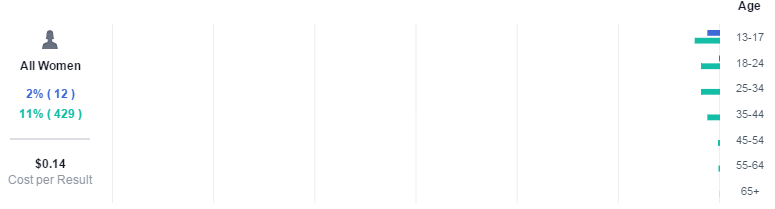
In the Project Proposal, I explained through bullet points that Bailey is a 10 year old Shiba Inu and that I would expose her through social media. I revealed the dates it ran, as well as the 3 phases. Phase 1: Create a Facebook Ad Campaign. Phase 2: Put Advertisement into motion. Phase 3: Review results of campaign. The last bullet point included the $20 budget. On the Facebook Advertisement slide, I posted the screenshot of the audience definition. In bullet points I listed the Target Market, Potential Reach, the Budget (once again), as well as the start date. The Results slide only showed People reached and Cost per click along with screenshots. On the Demographics slide, I applied screenshots of the ages of all men and women. Women cost $0.14 per click while men cost only $0.03 per click. I commented on how 80% of the likes were from young teenage males, which surprised me. The last slide is the Conclusion. Here I mentioned what my original goals were before I ran the campaign and how the results exceeded my goals.


Tuesday, November 24, 2015

Facebook Ad Campaign for Social Media Marketing Project

Our class was to make a Facebook campaign for our final presentation. I decided to create a campaign on gaining page likes for my dog Bailey.
       
Earlier in the course, we were required to make a Facebook page just to get an idea of how to do it. I made one for my dog. When this project came about I thought to myself, "Well, she's a real pet and her page is already set up. So I guess I can advertise her and see what kind of people would be interested in clicking on her." We weren't required to actually put money into the campaign, but it was recommended. I put $20 towards a 3 day campaign (11/18-11/20) to gain likes for Bailey's page. I assumed she would have reached about 6,000 people, accumulated 80 clicks, and accumulated at lease 20 likes.

Here are the results:
Results on graph


Ages of audience 
Ad placement
I was presently surprised on many likes Bailey's page got. She accumulated 739 new page likes and reach a little over 7,000 people! That was much greater than what I projected before the campaign ran. I found it interesting that 80% of the total likes gained were from males between the ages of 13-17. I'd expected to attract mostly females and a little bit of an older age group. Either way, I'd say the campaign was pretty successful. 


Ch. 11

In this chapter, Bolles explains how to start your own business.

So what if you can't find a job that suits you? Maybe you just don't want to work for someone else. Well, why not start a business? "According to some surveys, up to 80% of all workers have toyed with this idea at some point in their lives." Some examples of dreams that people may have are opening their own bake shop, selling jewelry,  or even creating their own website where they can teach people how to "go green." You might not even have any ideas yet, but you just know that you want to be your own boss and are open to suggestions.

By giving 3 case histories, Bolles makes his point on how starting a business can be fairly easy or very difficult. After reading them, he points out what things they all have in common:

a.) The individuals didn't need a ton of money to start up.
b.) The individuals had to do a lot of research in order to be successful.
c.) The individuals all used the Internet as s key tool in helping them expose their product, service, or expertise to the public.
d.) None of the individuals went down the traditional path that most would think to do.


If you are unsure what kind of business to launch, you should follow the 4 steps to see what you might do.

Write: Start with reading Chapter 7 again, which is understand who you truly are. It is a good idea to get out a blank sheet of paper and write down any ideas you may come up with. Then, you can write your resume along with the guidance of Chapter 2 on how to write your resume.

Read: By now, hopefully you have 3 different business ventures thought up. Bolles provides multiple websites to take a peek at regarding "all the virtues and perils running your own business." Websites like Working Solo, Small Business Administration, and A Small Business Expert, just to name a few.

Explore: With your business in mind, "you must find out what skills, knowledge, or experience it takes to make this kind of business idea work, by interviewing several business owners." This is known as List A. Then you need to make a list of skills, knowledge, or experience that you have. This is known as List B. By subtracting List B from A, you get what skills, knowledge, or experience you are missing, which is List C. List C is names of friends or co workers that do have these skills that you lack that might be able to help with your business.

Get Feedback: Are you cut out for creating your own business? You can find out on Working Solo. This is link is a self-examination type questionnaire that you can fill out which "encourages you to ask the hard questions."

Thursday, November 19, 2015

Ch. 10

In this chapter, Bolles talks about five different ways to choose or change your career.

1.) The first way to go about changing your path is to go online and look at O*Net Online, which is something Bolles mentioned in a previous chapter. On the home page, you will find multiple links that either have you take a career quiz, find job openings, or see what's offered for driving and work from your home jobs. This can be a useful tool whether you are still unsure about your new career choice or you know exactly what you are looking for. I think it's a great website to take advantage of.

2.) The next way mentions career tests. They can be very useful to some people, and not so useful to others. The tests can only be so broad, so they might not be right for you because you are unique and there is no other person just like you. Bolles words it that taking the test "can only describe the family in which you belong." Apparently that's just not enough when picking a career you love! When taking a test, be open minded and don't try to come up with the end result it might give you. Taking several tests can help as well. You might get "mixed reviews" from each test taken, so Bolles provides testing websites like The Dewey Color System, Dr. John Holland's Self-Directed Search, and The University of Missouri' Career Interests Game. 
The Dewey Color System test
3.) Using your Flower Diagram he suggested to make in Chapter 7. This Chapter tells us how to use it to "breakdown and build it up to define a career for you."

4.) You can change a career in two steps. Bolles mentions that we must consider the job title vs. the field in which it's in. "Title is really a symbol for what you do. Field is where you do it, or what you do it with." He provides a diagram to show how there is 3 ways to change careers. One way that he names "the Difficult Path" is jumping right into that line of work that you want to do. For example, if an Accountant suddenly decides he wants to become a reporter on new medical developments, you have to ease into it. Look into being an accountant at a Hospital for medicine research or see how you can get involved with television that leads to reporting. 

5.) Last but not least, you should look into what the job market needs these days. See what's in demand or what is projected to be rising in demand. Going to the U.S. Bureau of Labor Statistics and browse around on the site. It would be best to look at the level of education needed for certain jobs that are growing faster-than-average.  
Guide to career information on the T.S. Bureau of Labor Statistics


Monday, November 16, 2015

Ch. 9

This Chapter talks about how to handle your handicaps or anything else that is holding you down from a job.

When you go to a job interview, you could think of hundreds of ways that you could get turned down. "I never graduated high school/college. I am too fat, ugly, etc. I am Black, Hispanic, etc. I am too shy. I haven't had enough experience." These are just some of statements that people come up with when walking into an interview. Bolles says that yes, a handicap might keep some employers from hiring you, but not all; we cannot generalize all employers. But we can divide employers into 2 tribes, "employers who are interested in hiring you for what you can do; vs. employers who are bothered by what you can't do." For the ones who seem to focus more on what you can't do, respectfully decline their offer and ask if there are other employers who would be interested in your skills. It's okay if it takes a long time to find a job you'd really love and feel respected by the employer.

Everyone is handicapped in their own way, so it's best to not only focus on what you can't do. 
Bolles suggests to get a piece of paper and write a list (side by side) of skills you have and don't have.  He has a list of 246 skills as verbs list on the next page if you are having trouble getting the list long. Once you're done, he says to pick out 5 skills that you like and write examples of how you've done them recently.

Disabilities and prejudices are 2 very different things. "A disability is something wrong with you. A prejudice is something within the employer." But both are considered handicaps because both can prevent you from being hired. Some examples of prejudices are being out of work too long, age, returning veterans, ex-offenders, former patient, and others.


Friday, November 6, 2015

Hootsuite Certification and Enterprise Training Courseware

During the semester, we were to keep in mind that we (the students) had to pass the Hootsuite Exam in order to pass the course. We were to log into our Hootsuite account and watch the tutorial videos about how to use Hootsuite and why it is a useful tool when managing multiple social media accounts and posts.

One of many videos we were to watch for the exam
Our professor suggested we take the test (even if we didn't know everything) just to get a feel for it. What's nice is you can take it as many times as you'd like until you pass. It took me only twice to get a 97% on it. I didn't even watch all of the tutorial videos! I decided to redo a couple of the questions I didn't get correct until I got 100%, but you really don't need to.

My final score on the exam