Showing posts with label Class Activities/Discussions. Show all posts

Tuesday, December 8, 2015

Adding Projects to LinkedIn

In order to showcase my social media blog and Bailey's Facebook campaign, I am able to include them in my Projects section of my profile. Here is how to do it.

Under your LinkedIn home page, go to Edit Profile and scroll down until you reach Projects.


Once there, you are able to add the project name, months in process, your occupation used to execute the project, it's URL link, and a brief description.


After you are done, click Save.


You are now ready to show the employers any projects you'd like to showcase!


Thursday, December 3, 2015

LinkedIn URL

This week in class, the students were to change their LinkedIn profiles URL. By doing this, it will enhance your personal brand.

To change your LinkedIn URL, you must log into your profile and click on the edit profile tab. Once there, you will see your profiles website name. Scrolling over it will reveal a settings key. By clicking on that, it will take you to another editing page for your profile.


On the top right corner will be an option to change your public profile URL. Clicking on the pencil tab, you are able to type in a new name.


Final Project Rough Draft

This week, our professor wanted the students to create a rough draft Powerpoint for our Facebook Ad Campaign. In this Powerpoint, I explained my Project Proposal, Facebook Advertisement, Results, Demographics, and a Conclusion slide.

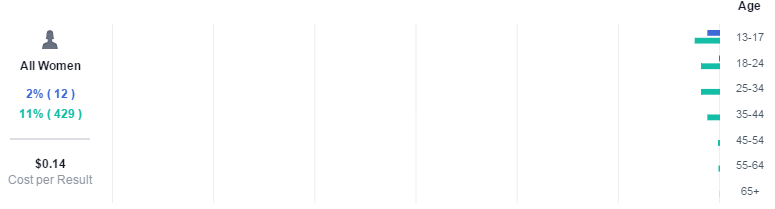
In the Project Proposal, I explained through bullet points that Bailey is a 10 year old Shiba Inu and that I would expose her through social media. I revealed the dates it ran, as well as the 3 phases. Phase 1: Create a Facebook Ad Campaign. Phase 2: Put Advertisement into motion. Phase 3: Review results of campaign. The last bullet point included the $20 budget. On the Facebook Advertisement slide, I posted the screenshot of the audience definition. In bullet points I listed the Target Market, Potential Reach, the Budget (once again), as well as the start date. The Results slide only showed People reached and Cost per click along with screenshots. On the Demographics slide, I applied screenshots of the ages of all men and women. Women cost $0.14 per click while men cost only $0.03 per click. I commented on how 80% of the likes were from young teenage males, which surprised me. The last slide is the Conclusion. Here I mentioned what my original goals were before I ran the campaign and how the results exceeded my goals.


Tuesday, November 24, 2015

Facebook Ad Campaign for Social Media Marketing Project

Our class was to make a Facebook campaign for our final presentation. I decided to create a campaign on gaining page likes for my dog Bailey.
       
Earlier in the course, we were required to make a Facebook page just to get an idea of how to do it. I made one for my dog. When this project came about I thought to myself, "Well, she's a real pet and her page is already set up. So I guess I can advertise her and see what kind of people would be interested in clicking on her." We weren't required to actually put money into the campaign, but it was recommended. I put $20 towards a 3 day campaign (11/18-11/20) to gain likes for Bailey's page. I assumed she would have reached about 6,000 people, accumulated 80 clicks, and accumulated at lease 20 likes.

Here are the results:
Results on graph


Ages of audience 
Ad placement
I was presently surprised on many likes Bailey's page got. She accumulated 739 new page likes and reach a little over 7,000 people! That was much greater than what I projected before the campaign ran. I found it interesting that 80% of the total likes gained were from males between the ages of 13-17. I'd expected to attract mostly females and a little bit of an older age group. Either way, I'd say the campaign was pretty successful. 


Friday, November 6, 2015

Hootsuite Certification and Enterprise Training Courseware

During the semester, we were to keep in mind that we (the students) had to pass the Hootsuite Exam in order to pass the course. We were to log into our Hootsuite account and watch the tutorial videos about how to use Hootsuite and why it is a useful tool when managing multiple social media accounts and posts.

One of many videos we were to watch for the exam
Our professor suggested we take the test (even if we didn't know everything) just to get a feel for it. What's nice is you can take it as many times as you'd like until you pass. It took me only twice to get a 97% on it. I didn't even watch all of the tutorial videos! I decided to redo a couple of the questions I didn't get correct until I got 100%, but you really don't need to.

My final score on the exam

Saturday, October 24, 2015

Hootsuite

This week we were to connect our social media web pages to Hootsuite and complete a course related to setting up our dashboard.

Our class created our own Hootsuite accounts towards the beginning of the semester. Now we are able to start using it because we have set up multiple social media profiles (Twitter, Linkedin, and Facebook). We were to go to our dashboard and add those social networks to Hootsuite by logging into our accounts and connecting them through Hootsuite, which was very easy.

A small portion of my Dashboard
Now that I have all 3 social networks in place, I can go ahead and make a post.

Posting an update to showcase my blog
By clicking on the calendar button (the 2nd button on the right hand side), I am able to actually schedule when my update will post. So if I want to, I can make multiple updates today and they will automatically post spaced out however I decide to schedule them. I clicked on the Send Now button since this is my first one through Hootsuite.

Surprisingly enough, I had gotten 20 new page views on my blog that day. I'm lucky if I get 1 or 2 on a normal day! With that said, I think Hootsuite is a great website to use to schedule posts on social networks.

Saturday, October 17, 2015

Stanford Credibility Study

This week, the class talked about what people looked for when determining how authentic a website was. We looked at the article How Do People Evaluate a Website's Credibility? 

In the study, people were to leave comments about the 100 different websites that they evaluated. The table below shows us how frequently certain categories were brought up.

Table 1 from the article
I find it interesting that over 46% determined credibility by design look. How the website looked were the top 2 concerns brought up in the 2,440 comments. I guess in this day and age it is important to keep an updated look or at least have an attractive layout (even back in 2002 when this study was taken!). I'm sure if this study was taken this year in 2015, that percentage would increase. Now that I think about it, it's based on first impressions. It takes a fraction of a second to decide if you like or don't like what you see. So the look and structure can determine whether a potential customer stays to look through your site, or look for another.

The next 4 concerns come to no surprise to me, which is related to information found in the websites. How the website represents itself and how much information is given about them is probably the most important categories to focus on. You can make a website look as pretty as you want, but if the information you provide about your business is not useful or accurate, then it just won't be as successful.

Tuesday, October 13, 2015

Creating a Facebook Ad Campaign

This week we were to create a Facebook Ad Campaign showcasing our blogs.

We were to go to facebook.com/advertising and select the tab "Send people to your website." We were to purchase a $5.00 lifetime budget for a few days (10/8-10/10). We were to include India in our locations we wanted to reach to increase our chances of clicks we might get. We also added Social Media Marketing and Digital Marketing to the interests section, so it would be relevant to who ever were to notice the ad.

After the Campaign ended, I was able to see my results in the graphs that show how much I spent and how many people it has reached during the time limit.

Graph regarding the amount of website clicks within the 3 day campaign

Graph regarding the amount of clicks and views between men and women separated by age groups

I noticed going through my insights, a majority of the people reached were in major cities like Los Angeles, Chicago, Houston, and New York. I also noticed that the majority of clicks the ad got was on 10/9, with 9 views.

Monday, October 12, 2015

Articles Regarding Post Frequency

Our class was to read these short articles,


They refer to how often we should post on social media in order to gain or keep the followers interested in the updates we are posting.

Reading the Infographic article, they show a graphic of how many posts on average that brands should post a day. I found it really interesting that Pinterest was the most frequent postings, with 5 a day. Oddly enough, Facebook was only at 2 posts per day "before likes and comments begin to drop off." How funny that is considering that Facebook is the most widely used social network in the world, according to the second article above, "70% of their study group accessed Facebook from their phones- to catch up on news feed updates, mostly- and 61% used it daily." About 14 times (on average) a day to be exact. I guess less is more in the world of digital advertising. There are so many other companies trying to get their name out there that it becomes overwhelming to the users, so they end up ignoring most (if not all) ads that come their way. 


Tuesday, September 29, 2015

Analyzing Facebook Posts

This week, we were added as administrators to our professors Facebook pages, NPOEx and These Songs of Freedom.

We were to do an analysis on NPOEx's post impressions. You are able to tell who saw the post by looking under each post where it says "People Reached," and how many viewers clicked on it where it says "Post Clicks." Some of these posts were what Facebook calls "Boosted," where Facebook asks if you would like your post to reach more people you normally would "Organically." Of course it comes with a price. For example, one post had a YouTube video about how stock exchange for non-profits could work. By paying $20, the post reached 10,200 people and achieved 20 clicks to the link. That's a dramatic difference compared to the organic reach which was 16 people.We assume that once we post something on our Facebook wall, the whole world is able to see it once it gets a few likes or shares. Most of the time, that's not what happens. There's so many posts and pages that are trying to expose themselves on social media that it's kind of overwhelming. That's why Facebook asks if you'd like to pay them to boost your posts. So chances are if you make a page, word won't spread as quickly as you'd like.

Boosted Facebook post results on NPOEx

Our next page to analyze was These Songs of Freedom, which is a song our professor wrote "for people everywhere who hope for freedom," as it is mentioned in the page info description. We were to look at the insights and tell who visited the page. I first noticed a lot of posts are written in English and Arabic. It looks like Egypt is the #1 country that visited the page with 1,536 fans. Insights also shows what cities fans are from and what language they speak (top languages are English then Arabic) so we know exactly where they are coming from. The page has reached close to the same amount of men as of women, which is 53% men and 46% women. Most of these men and women are between 18 and 24 years of age. This insight information is helpful in the fact that we see what posts work in gaining those fans as well as what may not work to keep them.

Statistics about fans for These Songs of Freedom page

Thursday, September 24, 2015

Creating a Facebook Page

Today, our professor wanted us to create a Facebook page. I've never done this before, so I wasn't sure where to begin. It only took a few minutes to set one up. I never knew that you could still be logged in your own personal Facebook account and just create a page so quick and easy.

I decided to make a page about my dog, Bailey. I set her as a public figure under the Pet category. I also was able to change my URL to BaileytheShibaInu. I made the page for her because I wasn't sure what I'd make a page about that didn't already exist. So I thought it would be a cute idea to just make one for my dog. I take way too many photos and videos of her anyway, so I know I would be able to have enough posts for her page. I also have photos of her including my other dog Rex, who is a flat coated retriever, and my cat Pogo, who is a 3 legged rescue we found in our neighborhood when he was a kitten. I will make the main focus on Bailey, but the other animals are included to show how well they all get along together.

For now my page doesn't have much exposure. I don't have any likes just yet, but once I share it on my personal Facebook and Instagram, I think Bailey will start to build up some fans!

Visit Bailey's Page

Tuesday, September 15, 2015

Linkedin

Linkedin was introduced to our class last week. My professor said that we should make one because it is a great tool to have when searching for a job or getting in touch with managers from business we might be interested in pursuing.

I never really ever thought I'd need a Linkedin. I just thought applying online and submitting my resume was the thing to do, but I guess we should be expanding ourselves on the internet in case employers Google us (according to the book What Color is Your Parachute we are reading for class). More like when employers Google us. My professor also suggested to the class that we add skills to our profile, which immensely improves our chances of finding a company to work for, as well as a company searching for individuals who have those skills.

How you express ourselves on the internet can either land you a job you wanted or give a bad impression on an employer. I see now why I should have created one years ago when I was applying for a job I'd like. Where I work now, I know nearly every department and almost everything about the company. My managers know that I am eager to learn more and more about to the company so I can improve my skills and knowledge as employee. Although I am content where I work now, I do want to expand my "online resume" so that after I graduate from school with my Bachelors in Marketing, I will have a higher chance of being recruited to a new company involving work with my major.

Check out my Profile


Tuesday, September 8, 2015

Social Monitoring Activity

What does the public really think about certain celebrities? How can we find out?

We can agree that in our society today, surrounded with constant access to the internet, opinions can swing every which way. Especially since social media makes the public's opinions easier and faster to communicate. Last week in class, Social Mention and Google Trends was introduced. I decided to research Kanye West.

I wanted to research Kanye West in socialmention.com because of all the controversy he had created recently by stating at the VMA's that he will run for president in 2020. I mean, the guy is a great musical artist, but I wouldn't want him running our country.

On Social Mention, his average score of being mentioned at 6 o'clock at night on social media is every 35 seconds. That is a dramatically different number comparing to 10 o'clock that Thursday morning (being mentioned every 3 minutes). He seems to be talked about pretty positively with a 7:1 ratio, which is really surprising to me. According to Google Trends, West reached his peak of interest from the public in September of 2009 after he grabbed the microphone and took over Taylor Swifts speech when she won an award for best female music video. He claimed Beyonce had the best music video and he reached 100% on the Google trend chart. Through the years he has teetered between 15-40%. Within 3 days, he has risen that number from 21% to 74% and still rising. We'll see if he can repeat that record back in '09!

Kanye's score on Social Mention
Kanye's score on Google Trends